
Ginja Casino App: Android APK v6.7.9 - Download and Install Guide
If you've found the Ginja Casino app while researching the platform, the first two questions are usually the same: is the APK safe to install, and what does it actually add over the mobile browser? This page answers both. It also covers the technical specifications of the current APK, the step-by-step installation process, every confirmed feature the app provides, and what to do if you're on an iPhone.
The Ginja Casino Android app is version 6.7.9, weighs 6.7 MB, and is available exclusively from the casino's own download page at ginja-casino.com/en/androidapplication. It is not listed on Google Play. Installing it and logging in for the first time unlocks 50 free spins at no cost - a standing offer that does not require a deposit. The app covers the full game library, sportsbook, live casino, payments and account management from a single interface.
A note on what this page does and does not cover: the specific in-app screens for registration, login, and KYC document upload are not shown in the screenshots available for this review. Where we describe in-app flows, we are working from the casino's own published feature descriptions and the APK's technical metadata. The general interface is the same as the mobile website, since the app is a WebView wrapper rather than a native build.
Ginja Casino Android app: technical specifications
APK metadata and confirmed feature set, based on file analysis of version 6.7.9.
| Parameter | Value |
|---|---|
| App name | Ginja Casino |
| Platform | Android only |
| APK version | 6.7.9 |
| File size | 6.7 MB |
| Package name | com.casino.ginjacasino1com |
| App type | WebView wrapper (loads ginja-casino1.com) |
| Build tool | Android Gradle Plugin 8.13.0 |
| Activities | MainActivity, WebViewActivity |
| File upload | Yes (KYC document upload via WebChromeClient) |
| Download manager | Yes (for file downloads in-session) |
| Wake lock | Yes (keeps screen active during live play) |
| Download URL | ginja-casino.com/en/androidapplication |
| QR code available | Yes |
| iOS app | Not available |
| Install bonus | 50 free spins (no deposit required) |
Ginja Casino Android app: what it is and what you get
The Ginja Casino Android app packages the casino's full platform into a 6.7 MB APK that installs on any Android device running a reasonably current OS version. It is not a reduced-feature mobile site in app form - it carries slots, live casino, instant games, jackpots, the full sportsbook and account management, all within the same session.
The app description from Ginja Casino's own page puts it simply: "Install Ginja's app on your Android device, and the full lineup travels with you - slots, sports, live tables, all in one place." The specific features that differentiate the app from a browser session include one-tap account entry, Smart Play controls accessible without leaving a game, a two-tap withdrawal shortcut, and promotions that are only visible inside the app.
What is the Ginja Casino APK and how does it work?
The APK is technically a WebView application - a native Android shell that loads the Ginja Casino website (specifically ginja-casino1.com) inside a native wrapper. The shell adds Android-specific capabilities on top of the web content: file upload for KYC documents, a wake lock that prevents the screen from timing out during a live dealer session, a download manager for in-session files, and persistent login state so you do not re-enter credentials each time you open the app.
In practice, this architecture means the app experience closely mirrors the mobile website rather than a purpose-built native application. The meaningful differences are the added native capabilities - the wake lock, the file chooser for document uploads, and the one-tap access that remembers your session - rather than a fundamentally different interface. Players who expect a fully bespoke native design should note this distinction.
Ginja Casino app vs browser: which gives a better experience?
The app wins on convenience for players who use the casino regularly. One-tap entry removes the login step for returning sessions, the Smart Play limit controls are accessible mid-session, and the two-tap withdrawal is faster than navigating to the Cashier in a browser. The browser is sufficient for occasional use and is the only option for iPhone users. Neither version restricts access to specific game categories - the game library is identical across both access points. The practical differentiator is workflow efficiency rather than feature access.
How to download and install the Ginja Casino APK on Android
The APK is downloaded directly from ginja-casino.com, not from the Google Play Store. This requires a one-time Android permission change before installation, which is standard for any third-party APK. The process takes two to three minutes from download to first login.
Note: Before tapping the download button, open your Android Settings, navigate to Security or Privacy (depending on your Android version), and enable "Install from unknown sources" for your browser application. Without this setting, Android will block the APK file when you try to open it. On newer Android versions (8+), you enable this setting for the specific app you're using to open the file rather than globally.
Step-by-step: how to install the Ginja Casino APK on Android
- On your Android device, open a browser and go to ginja-casino.com/en/androidapplication.
- Tap the "Download the App" button. The APK file (approximately 6.7 MB) will download to your device.
- If prompted, go to Settings > Security (or Privacy) and enable installation from unknown sources for your browser.
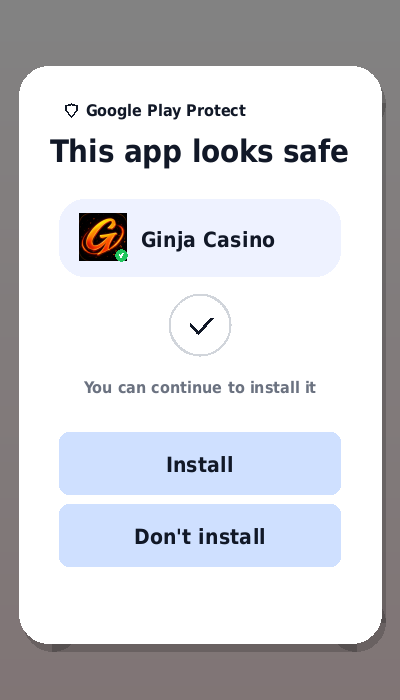
- Open the downloaded APK file from your notifications bar or file manager. An installation prompt appears.
- Tap Install and wait for the process to complete - it takes under ten seconds at that file size.
- Open the app, log in with your existing Ginja Casino credentials, and navigate to the Bonuses section to claim your 50 free spins.
The 50 FS offer appears after your first login in the app and does not require a deposit. It is separate from the casino's deposit welcome bonus of 125% up to €500 .
How to use the QR code to download the Ginja Casino app
The download page at ginja-casino.com/en/androidapplication displays a QR code alongside the direct download button. Point your phone's native camera app at the code from another device - or from the desktop version of the page if you have the page open on a computer. The camera detects the code and generates a prompt linking directly to the APK download. This is faster than typing the URL manually on mobile if you have access to a second screen.
The 50 free spins tied to installing the Ginja Casino APK
Installing the Ginja Casino Android app and completing your first login triggers a 50 free spins bonus with no deposit required. This offer is a standing feature of the app - not a time-limited promotion - and applies to any new install by an account that has not previously claimed it.
The 50 spins activate separately from any deposit-based welcome bonus on your account. You can hold the app install bonus and a deposit welcome bonus simultaneously, provided neither has expired.
Activating the 50 free spins reward after the Ginja Casino APK install
After installation and first login, navigate to the Bonuses section within the app. The 50 FS offer should appear as an available claim. Tap Claim. The specific slot or slots eligible for these spins are displayed alongside the offer. Wagering requirements apply to winnings from the free spins before those winnings can be withdrawn - the multiplier is not published publicly. For the full picture of how Ginja Casino bonus mechanics work, the bonus wagering structure is covered separately.
Are there other app-only bonuses at Ginja Casino?
Yes. Ginja Casino explicitly states that the app contains promotions that do not appear on the desktop or mobile website. These app-exclusive offers rotate, so their specific contents are not predictable from a static review. The Bonuses section inside the app is the only place to see them. Checking that section after each login is the practical way to stay across whatever offers are currently active.
Ginja Casino app features: Smart Play, quick withdrawal and more
The app adds four specific functional advantages over using the casino through a mobile browser. Smart Play provides in-session limit controls. The quick withdrawal button compresses a cashout request to two taps. One-tap entry maintains your session without re-login. And app-exclusive promotions are not reachable by any other route.
Beyond those differentiators, the app's design follows Ginja Casino's own description: "built for mobile - runs smoothly, loads fast, designed for thumb reach." The navigation bar gives direct access to Casino, Sports, Bonuses, and account settings from a fixed position.
How do you set deposit and time limits in the Ginja Casino app?
Smart Play is Ginja Casino's in-app responsible gaming tool. Access it from the account or settings area of the app. You can set a deposit limit (maximum amount you allow yourself to deposit within a given period) and a time reminder (an alert that fires after a set duration of play). Both controls operate without requiring you to leave your current game or navigate to the website. The time reminder is a notification; it does not force-end a session. Setting these limits takes effect immediately.
Quick withdrawal in two taps: how it works on the Ginja Casino app
The two-tap withdrawal is a shortcut built into the app's navigation. Tap the withdrawal button, confirm the amount and method, and the request is submitted to the cashier. The same-method rule from your deposit history still applies - the app does not bypass payment requirements, it just removes the navigation steps. The 24/7 processing applies to requests submitted via the app as well as via the website. Withdrawals via the app are subject to the same verification checks as browser-based requests.
Full game library on mobile: every slot, table and sport in one place
Every game available on the Ginja Casino desktop site is accessible in the Android app. Slots from all seventeen-plus confirmed providers, live dealer tables, instant games, jackpots and the sportsbook are all present. The app navigation switches between sports and casino with a single tap - there is no separate sports app or casino app. The wake lock feature keeps your screen active during live dealer sessions without the display timing out mid-hand.
Ginja Casino APK technical specifications
The technical details of the APK come from direct file analysis of version 6.7.9, confirmed against the APK metadata.
What version is the Ginja Casino APK? Technical details
The current Ginja Casino APK is version 6.7.9, file size 6.7 MB, with package identifier com.casino.ginjacasino1com. The app was built using Android Gradle Plugin version 8.13.0. It contains five DEX files (classes.dex through classes5.dex), a MainActivity for the launch screen, and a WebViewActivity that handles the primary browsing session. File upload capability is confirmed via the WebChromeClient file chooser implementation, which supports KYC document submission without leaving the app.
Is the Ginja Casino APK safe to install?
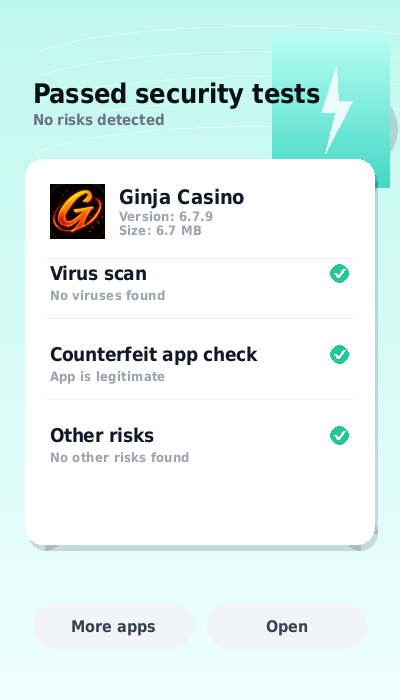
The APK is published by the casino operator at ginja-casino.com and ginjacasino-official.com - both are official domains under Bluestream N.V.'s operation. Downloading from these URLs ensures you receive the publisher's file rather than a third-party redistribution. The app does not request unusual device permissions: its confirmed capabilities are standard for a gambling app (camera for QR, storage for downloads, wake lock for active sessions). Third-party APK hosting sites for this app exist but carry the usual risks of modified files; always download from the official URL.
Does Ginja Casino have an iOS app?
No iOS app for Ginja Casino has been published. The operator's download page and all available documentation reference Android only. iPhone and iPad users access Ginja Casino through Safari, Chrome or another mobile browser at ginja-casino.com or ginjacasino-official.com.
Why there is no Ginja Casino iPhone app at this time
Apple's App Store policies apply strict compliance requirements to real-money gambling apps in most markets. Publishers must hold specific regional gambling licences to distribute through the App Store in many jurisdictions. Ginja Casino holds a Curacao international licence rather than regionally specific licences in markets like Portugal or Spain, which limits the distribution routes available through the App Store. Sideloading APKs without the App Store is not possible on iOS without a jailbroken device, which means Android remains the only native app platform for this operator.
Using Ginja Casino on iPhone: the mobile browser option
The mobile browser version of Ginja Casino on iOS is a full-access alternative to the app. The site is mobile-responsive and all game categories, payment methods and account functions are available. The specific features that the Android app adds - Smart Play in-session controls, the two-tap withdrawal shortcut, and app-exclusive bonuses - are not available through the mobile browser on any platform, including iPhone. For occasional use or for players who primarily play slots, the browser version is fully functional. For players who want the limit-setting tools or the quick withdrawal, Android is the required platform.
When the Ginja Casino app may not be enough
Three scenarios exist where the app's limitations become relevant. First, the absence of an iOS version is a hard limitation for iPhone users who specifically want a native app. Second, since the app is a WebView wrapper, its performance depends on the stability of the casino website - if the underlying site has an issue, the app reflects it. Third, the app does not publish any additional specification beyond version 6.7.9 from the file metadata; automatic update mechanisms and update frequency are not documented publicly.
Getting started with the Ginja Casino Android app
The Ginja Casino Android app is a functional, lightweight install that adds genuine convenience for players who use the platform regularly. The 50 FS install bonus gives an immediate reason to download it even before a deposit decision is made. The Smart Play tools and two-tap withdrawal make it the more practical choice over a mobile browser for day-to-day use.
Download the APK from ginja-casino.com/en/androidapplication, enable your Android device's unknown sources permission, and complete the installation. The process is straightforward and the file size means it downloads in seconds on any standard mobile connection.